Iframe XSS Explained: Trust Boundaries, Messages, and Embedded Content
Iframe XSS isn’t one single bug class. It can refer to XSS inside framed content, unsafe srcdoc, user-controlled iframe sources, weak postMessage handling, over-trusted widgets, or parent pages that trust child frames too much. The fix starts with trust boundaries: control iframe sources, sandbox untrusted content, validate message origins and structure, use CSP, and avoid putting untrusted data into dangerous DOM sinks.

An iframe creates a browser context boundary. It’s not a complete security model by itself. The risk comes from what crosses that boundary.
A payment widget, support chat, admin preview, analytics dashboard, document viewer, or customer-generated embed can all be safe. They become risky when the parent page and child frame start trusting each other without clear rules.
That’s where web application penetration testing needs human judgement. Automated tools catch some reflected and stored XSS. However, they struggle when the bug sits in multi-frame logic, message handling, partner widgets, and business-specific trust assumptions.
What Iframe XSS Usually Means
The phrase iframe XSS gets used for several related issues.
It can refer to XSS inside the page loaded by an iframe or to a parent page that creates an iframe from unsafe user input. In modern applications, it often points to message-based flows where a child frame sends data to a parent page, and the parent handles that data unsafely.
| Pattern | Where the Risk Sits |
| XSS Inside Framed Content | The iframe source page renders untrusted data unsafely. |
Unsafe srcdoc | Inline HTML is placed into a frame without proper controls. |
User-Controlled src | Attackers influence which URL the iframe loads. |
Weak postMessage Handling | Parent or child accepts messages from the wrong origin or source. |
| Over-Trusted Widget | Third-party content receives too much access or trust. |
| Unsafe DOM Update | Message data flows into HTML, script, or URL sinks. |
Iframe XSS Is Not the Same as Clickjacking
Iframe XSS and clickjacking both involve frames, but they’re different problems.
Clickjacking is about tricking users into interacting with a framed page they don’t realise they’re using. X-Frame-Options and CSP frame-ancestors help control whether other pages can embed your page, which is why these controls are important for clickjacking defence.
Iframe XSS is script execution or unsafe data handling in an embedded-content flow.
You need to consider both issues, but keep them separate. A strong frame-ancestors policy reduces clickjacking exposure. It doesn’t fix unsafe postMessage parsing, unsafe srcdoc, or DOM XSS inside a widget.
Where Trust Breaks in Embedded Content
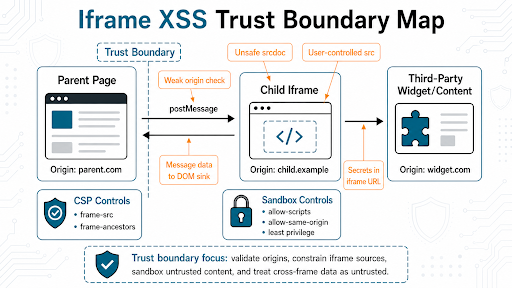
The Parent Trusts the Child Too Much
A parent page often listens for messages from an iframe. That’s normal. The risk appears when the parent accepts any message, trusts loose origin checks, or treats message data as safe HTML.
MDN tells developers to specify an exact target origin rather than * when using postMessage. It also says any window can send a message to another window, so receivers must verify the sender’s identity through origin and, where relevant, source.
Origin checks are only the first gate.
Validate the message schema as well. Check the expected message type, required fields, allowed actions, data shape, and permissions. Review event.source where the flow expects messages from a specific frame or window.
A trusted origin can still send unsafe or unexpected data if that origin has its own XSS flaw or compromised widget logic. A message saying “resize widget” is different from one that says “update account email”. Treat them differently.
User-Controlled Sources Load the Wrong Content
If users can influence an iframe src, developers need strict source validation. A frame meant to load a trusted payment page, document viewer, or support widget shouldn’t load arbitrary external content.
Use server-side allowlists, fixed origins, strict URL parsing, and CSP frame-src. Watch for partial string checks, open redirects, protocol-relative URLs, and partner domains that host user-generated content.
MDN defines frame-src as the CSP directive that controls valid sources for nested browsing contexts such as frames and iframes.
The Child Receives Sensitive Data It Doesn’t Need
Iframes are often used to isolate third-party or lower-trust content. That isolation fails when the parent sends unnecessary data into the frame.
Don’t place tokens, session state, or sensitive user data in iframe URLs, including query strings and fragments. URLs leak into logs, browser history, referrers, screenshots, and support tooling far too easily.
Use short-lived, purpose-limited data where the flow truly needs it. Better still, design the frame to ask the server for what it needs under clear authorisation rules.
srcdoc Turns Strings Into Documents
The srcdoc attribute lets a page provide inline HTML for an iframe. That is powerful. It’s easy to misuse.
MDN warns that srcdoc allows HTML markup to run in a frame by default and that without the right sandboxing the frame can be same-origin with the parent and access parent resources. MDN also recommends enforcing TrustedHTML and Trusted Types for safer srcdoc assignment.
Use srcdoc only when you control the content or when it has been properly sanitised and constrained. Don’t feed user-generated HTML into srcdoc and hope the iframe will make it safe.
Hope is not a browser control.
For applications with heavy client-side rendering, Trusted Types can reduce DOM XSS risk by restricting dangerous string-to-DOM assignments.
The Sandbox Is Too Permissive
The iframe sandbox attribute restricts what framed content can do. OWASP recommends sandboxed frames for untrusted external content and warns against inserting message data into the DOM through unsafe sinks.
The mistake is treating the sandbox as a checkbox.
Each permission changes the boundary. Scripts, forms, popups, downloads, same-origin behaviour, and top-level navigation should only be allowed when the embedded flow needs them.
Treat allow-scripts plus allow-same-origin as a high-risk combination for same-origin or attacker-influenced content. MDN warns that for same-origin embedded documents, this combination can let the embedded document remove the sandbox attribute, making sandboxing no more secure than not using it.
Give embedded content the smallest useful capability set.
CSP Controls That Matter
Content Security Policy helps frame security in two directions.
- Use
frame-srcto control where your page can load frames from. - Use
frame-ancestorsto control who can embed your page.
CSP won’t repair broken application logic. However, it gives the browser rules that reduce exposure when something else goes wrong.
What Developers Should Test
- Map Every Frame. List each iframe, its source, owner, purpose, data sensitivity, and trust level.
- Lock Down Sources. Confirm iframe URLs are fixed, allowlisted, or server-controlled. User-controlled frame sources need strict validation.
- Review
postMessageBoth Ways. Check exact target origins, incoming origin validation,event.source, message type checks, and data structure validation.
- Trace Message Data to DOM Sinks. Make sure message data doesn’t flow into unsafe HTML, script, URL, or template sinks.
- Check
srcdocand Inline HTML. Treat inline frame content as HTML execution unless strong sanitisation and sandboxing can prove otherwise.
- Right-Size the Sandbox. Remove permissions the iframe doesn’t need. Be especially careful with scripts, same-origin behaviour, forms, and top navigation.
- Apply CSP Deliberately. Use
frame-srcfor what you embed andframe-ancestorsfor who embeds you.
- Keep Secrets Out of Iframe URLs. Don’t place tokens, session state, or sensitive user data in iframe URLs, including fragments.
This scenario is where a code audit changes the finding. Source review follows message handlers, trust checks, template rendering, and unsafe DOM sinks. Runtime testing proves whether the issue is reachable in the application.
What a Useful Finding Should Prove
A useful iframe XSS finding must do more than just say “iframe present”.
It should prove:
- Which parent and child origins are involved.
- What data crosses the boundary.
- Which side trusts the other side.
- Which validation is missing.
- Whether CSP or sandboxing reduces impact.
- Which DOM sink receives untrusted data.
- Which fix closes the tested path.
This detail helps developers fix the root cause, rather than blindly removing an iframe and breaking the product.
Validate Embedded Content Flow
7ASecurity can review iframe sources, message handling, CSP, sandbox attributes, and DOM data flows so your team can see which trust assumptions create real browser-side risk.
Plan a Scoped Web App Test or Code Audit
FAQs
Are Iframes Unsafe by Default?
No. Iframes are a standard browser feature. They become risky when embedded content, parent pages, or message flows have weak trust boundaries.
Is Iframe XSS Just Clickjacking?
No. Clickjacking tricks users into interacting with framed content. Iframe XSS involves script execution or unsafe data handling in embedded content flows. Related topic, different bug.
Does the Sandbox Attribute Prevent All Iframe XSS?
No. Sandboxing helps, but the permissions matter. A loose sandbox can leave too much capability available to the framed content.
What Should We Check in postMessage Handlers?
Check exact origins, event.source, expected message types, schema validation, action permissions, and how message data is used. Don’t treat message data as trusted HTML.
Should We Block All Third-Party Iframes?
No. Use them where the business need is clear. Limit sources with CSP, sandbox where possible, keep sensitive data out of iframe URLs, and validate every communication path.
Treat the Frame as a Trust Decision
An iframe isn’t dangerous by itself. Blind trust across the iframe boundary is the problem. Speak to us about testing browser logic, reviewing the code path, and giving your team a clear correction plan.