
A cache DB is a common search term for a cache layer, cache store, or in-memory data store. It keeps frequently used data close to the application to reduce latency and load. The security risk is simple: cached data still counts. Sessions, tokens, user records, API responses, authorisation state, browser cache files, and mobile cache files all need access control, expiry rules, isolation, and testing.

A cache is meant to make systems faster. That speed becomes a problem when the cache stores data nobody expects to protect.
Tokens sit too long. User-specific API responses get shared. Redis or Memcached sits on the wrong network. Mobile apps cache sensitive files locally. Suddenly, the “temporary” layer matters as much as the primary database.
That’s why a cloud audit shouldn’t stop at public buckets, databases, and web endpoints. Cache layers can hold the data attackers want, or the trust decisions they can abuse.
What Is a Cache DB?
Strictly speaking, not every cache is a database, and not every in-memory data store is used only for caching. People also use the phrase “cache database", but in many systems the more accurate term is cache store, cache layer, or in-memory data store.
A cache is a high-speed storage layer used to keep frequently accessed data close to the application. It usually holds data for a shorter time than the primary database. It reduces latency, lowers database load, and helps applications respond faster.
A primary database is the source of truth. A cache is a shortcut.
That shortcut still needs security controls.
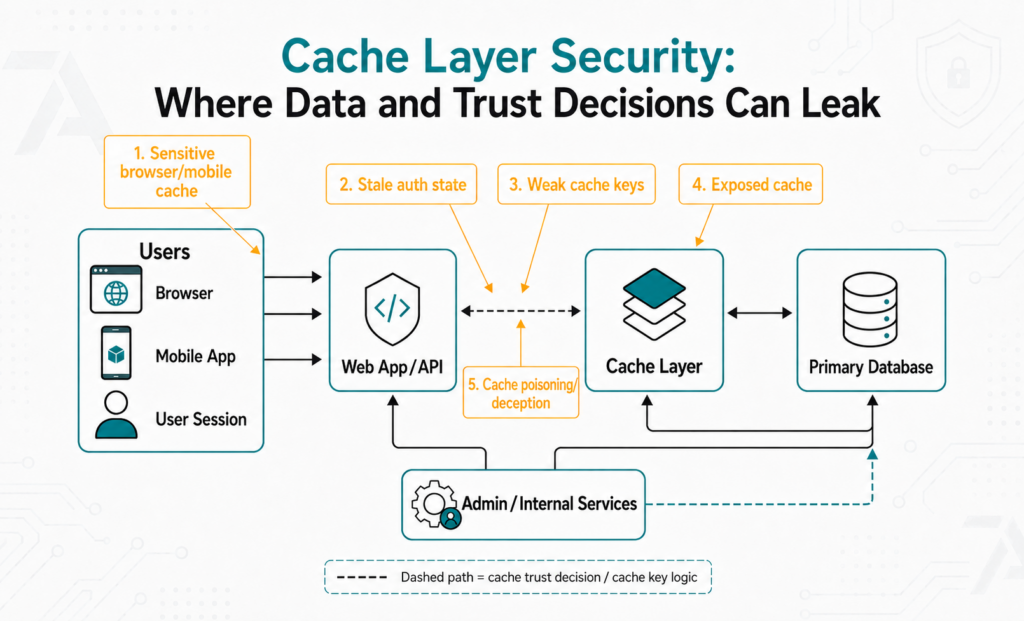
How Cache Layers Work
A cache is a local storage area that applications, users, or services can access when they need frequently requested data.
Instead of asking the primary database for the same data again and again, the application checks the cache first. If the data is there, the application responds faster. If it’s missing, the application fetches the data from the source of truth and often stores a copy for next time.
Common cache layers include:
- Redis and Memcached.
- Cloud-managed in-memory stores.
- API gateway caches.
- CDN and reverse proxy caches.
- Application-level caches.
- Browser caches.
- Mobile local caches.
Memcached describes itself as an in-memory key-value store for small chunks of arbitrary data from database calls, API calls, or page rendering. Redis is widely used for cache, database, messaging, and other data-structure patterns.
That flexibility is useful. It also means teams need to know exactly how each cache is used.
What Gets Stored in Cache Layers?
Caches often hold more than harmless page fragments.
Security-relevant cache data includes:
- Session state.
- Access tokens.
- User profiles.
- API responses.
- Account permissions.
- Rate-limit counters.
- Authorisation decisions.
- Pricing or order data.
- Mobile app files.
- Temporary exports or reports.
The security question is this: If someone reads, changes, or poisons this cache entry, what happens?
If the answer involves user data, access, payments, tenant boundaries, or admin decisions, the cache belongs in security testing.
Where Cache Risk Appears
Exposed Redis or Memcached Services
Redis’s security documentation explains that the database is designed for trusted clients inside trusted environments and that it must not be exposed directly to the internet or untrusted clients.
Memcached has a similar operational assumption. Its SASL documentation says most deployments exist inside trusted networks where clients freely connect to servers.
That model fails when security groups, firewall rules, Kubernetes services, or cloud routes expose the cache to the wrong place.
Missing Authentication and Weak Isolation
Cache access should be narrow. Application servers need access. Random workloads, developer laptops, internet clients, and neighbouring tenants don’t.
Use authentication and TLS where the technology supports them. Memcached 1.5.13+ supports authentication and encryption via TLS when built and configured for it.
Don’t rely on “it’s internal” unless you’ve tested what internal really means.
Long TTLs and Stale Access Decisions
TTL means time to live. It controls how long a cached item stays valid. Long TTLs create risk when cached data reflects access decisions. A user loses access, changes role, resets credentials, or leaves the organisation, but the cache still trusts the old state.
Fast systems shouldn’t make stale trust decisions.
For auth-related entries, use short TTLs, clear invalidation, and event-driven revocation where the risk justifies it.
Sensitive Data in Plaintext
Caches often sit close to the application, so teams treat them as safe. That’s a mistake.
Minimise what’s cached. Use encryption in transit where supported, and avoid storing highly sensitive values in the cache unless the design genuinely requires it.
A cache leak should not expose the same sensitive records, tokens, or admin data as the primary database.
Also check persistence and backups. Some cache stores write data to disk or snapshots, so sensitive cached data can survive longer than teams expect.
Cache Poisoning, Cache Deception, and Shared Response Risk
Cache poisoning and cache deception are different failure modes.
PortSwigger describes web cache poisoning as a technique where an attacker exploits server and cache behaviour so a harmful HTTP response is served to other users. Its guidance on web cache deception explains the distinction as
poisoning abuses cache-key or request-handling gaps to store a harmful response, while deception tricks a cache into storing private content that an attacker later accesses.
Both problems come back to cache keys, headers, routing rules, and application behaviour.
Cache keys should include the correct user, tenant, role, locale, and authorisation context. A cache key that ignores identity or tenant boundaries turns performance logic into an access-control risk.
Shared caches need clear rules for private data. User-specific pages, API responses, redirects, host handling, and tenant-specific content all deserve direct review.
Browser and Mobile Caches
Cache risk also lives on the client.
OWASP’s Web Security Testing Guide says testers should check that applications correctly instruct browsers not to retain sensitive data. It highlights browser caching as a risk for sensitive information after logout or navigation.
For sensitive web responses, use Cache-Control: no-store where appropriate.
Mobile apps add another layer. Local files, app databases, logs, background snapshots, and cached API responses can all expose data if storage choices are loose.
That’s why mobile app penetration testing should include local storage, tokens, logs, and cached API responses.
What Security Teams Should Check
A thorough cache review follows the data, not the product name.
| Area | What to Check |
| Exposure | Is the cache reachable only from trusted application components? |
| Authentication | Are clients authenticated where the technology supports it? |
| Data Type | Does the cache store tokens, sessions, personal data, tenant data, or auth decisions? |
| TTL | Are sensitive entries short-lived and invalidated after access changes? |
| Isolation | Are tenants, environments, and roles separated? |
| Cache Keys | Do keys include user, tenant, role, locale, and auth context where needed? |
| Persistence | Do snapshots, backups, or disk writes retain sensitive cached data? |
| Client Cache | Do browsers and mobile apps avoid storing sensitive responses? |
If cached data affects users, access, or trust, test it like a security boundary.
Where Manual Testing Changes the Finding
A scan can spot an exposed port, but it can’t explain the business impact of one cached object. Automated scans also miss many authenticated or internal-only cache paths, where the real question is what the application trusts after access is gained.
A useful finding should prove what the cache stores, who can reach it, which application path depends on it, and what happens when the value is stale, exposed, or polluted.
That’s where web application penetration testing and code audits work together. Runtime testing shows what the app allows. Source review traces how cache keys, TTLs, invalidation, and authorisation checks actually work.
Need to Know What Your Cache Layer Exposes?
7ASecurity can review cache exposure, application data flows, mobile storage, and code paths so your team can see whether the cache is only improving performance or quietly expanding risk.
Plan Your Scoped Security Test
Practical Fixes for Cache Security
- Remove Public Exposure. Keep cache services on private networks. Restrict access to known application components.
- Use Authentication and TLS Where Available. Don’t depend on network location alone when the cache stores sensitive data.
- Cache Less Sensitive Data. Store identifiers, derived values, or short-lived references instead of secrets and full records.
- Set Short TTLs for Trust Decisions. Permissions, sessions, and tokens need expiry and clear invalidation.
- Separate Tenants and Environments. Don’t let staging, production, tenants, or roles share cache namespaces without strict controls.
- Review Persistence and Backups. Confirm whether cache data is written to disk, replicated, or included in snapshots.
- Protect Browser and Mobile Caches. Use Cache-Control: no-store for sensitive web responses. Review mobile local storage and cached API data.
- Test Cache Keys and Deception Conditions. Make sure private data, headers, hosts, routes, and tenant identifiers don’t cross user boundaries.
FAQs
Is a Cache DB the Same as a Database?
Not always. "Cache database" is a common term, but “cache”, “cache store”, or “in-memory data store” is often more precise. A cache speeds access to data. The primary database remains the source of truth.
Is Redis a Cache DB?
Redis is often used as a cache, but it also supports database, messaging, and data-structure patterns. The security model still matters. Redis shouldn’t be directly exposed to untrusted networks.
What Data Should Not Be Cached?
Avoid caching secrets, long-lived tokens, raw payment data, sensitive exports, and unnecessary personal data. Use short TTLs, narrow access, strong invalidation, and encryption in transit where sensitive caching is required.
Can a Cache Leak User Data?
Yes. Leaks happen through exposed cache services, shared cache keys, stale authorisation data, browser caches, mobile local files, web cache deception, and API responses cached under the wrong conditions.
Should Security Testing Include Cache Layers?
Yes, when they store sensitive data or influence access decisions. A cache that affects users, sessions, permissions, tenants, or trust boundaries belongs in testing.
Don’t Let Performance Layers Become Blind Spots
A cache DB speeds up the system. It also holds sessions, responses, tokens, and trust decisions that shape security.
7ASecurity can test reachable services, review code paths, and give your team a detailed fix plan.