
Searches for jQuery 3.5.1 vulnerabilities often mix up older jQuery XSS issues with scanner noise. The major 2020 DOM manipulation flaws, CVE-2020-11022 and CVE-2020-11023, affected versions before 3.5.0. jQuery 3.5.1 followed 3.5.0 and kept those fixes while addressing a regression. Teams should still check loaded versions, old bundled copies, plugins, unsafe DOM insertion, and output encoding.
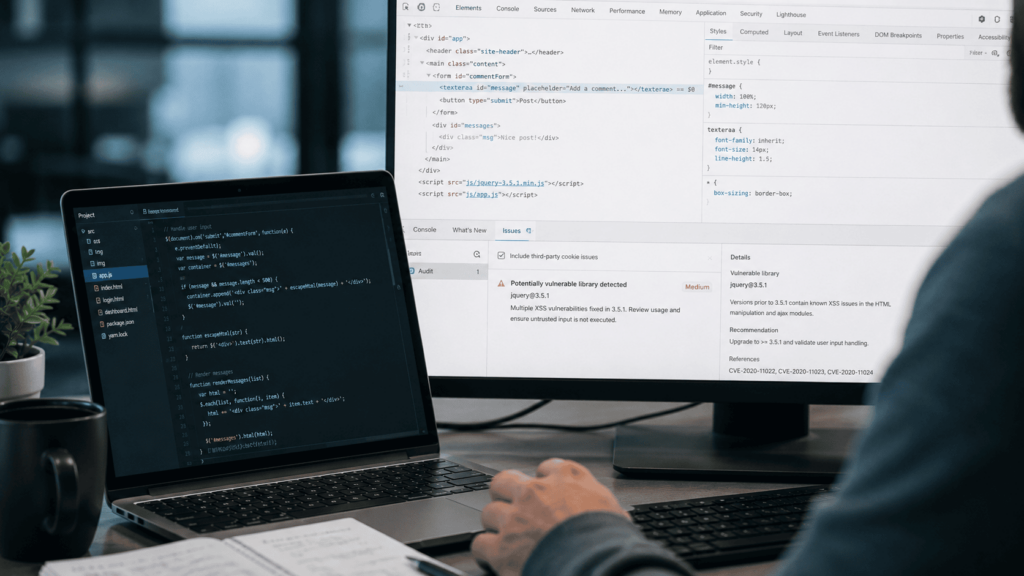
A scanner warning about jQuery 3.5.1 vulnerabilities deserves attention, not panic. The version number alone rarely tells the whole story.
A page can load jQuery 3.5.1 and still contain unsafe application code. It can also load 3.5.1 from one path while an old plugin bundles jQuery 1.x somewhere else.
That’s where a code audit helps. Instead of stopping at “a scanner mentioned jQuery", teams should trace where untrusted data flows and whether it reaches an unsafe DOM sink.
What’s Actually Vulnerable?
The two jQuery CVEs most often linked to this confusion are CVE-2020-11022 and CVE-2020-11023.
NVD states that CVE-2020-11022 affects jQuery starting with 1.12.0 and before 3.5.0. It applies when HTML from untrusted sources is passed to DOM manipulation methods such as .html() and .append(). According to NVD, the issue is patched in jQuery 3.5.0.
CVE-2020-11023 affects jQuery versions from 1.0.3 up to, but excluding, 3.5.0, noted the NVD. This issue also relates to untrusted HTML passed to DOM manipulation methods and was patched in 3.5.0.
That matters because jQuery 3.5.1 is not in those affected ranges.
The official jQuery 3.5.1 release post says jQuery 3.5.0 included fixes for two security issues in DOM manipulation methods. The 3.5.1 release then fixed a regression after that change.
Don’t treat 3.5.1 as vulnerable to those two CVEs unless your evidence shows a different loaded version, a reverted fix, or a custom build. Separately, review unsafe application behaviour that could still create XSS.
Why Scanners Still Flag jQuery 3.5.1 Vulnerabilities
Scanners flag jQuery findings for valid reasons and noisy ones.
Common causes include:
- An old jQuery file still exists on the server.
- The live page loads multiple jQuery versions.
- A plugin bundles its own outdated copy.
- A CDN reference differs from the local fallback.
- Cached assets show stale JavaScript.
- Source maps or build artefacts mention old versions.
- The scanner maps “jQuery” to broad XSS guidance, not the exact loaded runtime.
Treat the result as a lead, not a verdict.
First, confirm the version that the browser loads on each critical page. Then check whether that version is used by the risky code path.
A static file on disk is useful evidence. A reachable runtime path is better evidence.
The Real Risk: Unsafe DOM Patterns
The 2020 jQuery fixes matter, but version hygiene doesn’t replace secure coding.
The official jQuery 3.5.0 release explains that the security fix changed jQuery.htmlPrefilter, which previously modified HTML strings passed through jQuery manipulation methods. The jQuery 3.5 upgrade guide continues that the jQuery.htmlPrefilter now returns its argument unchanged and warns that reverting the behaviour loses the 3.5.0 security fix.
For engineering teams, the risk is obvious: Untrusted HTML should not flow into DOM insertion methods without strong controls.
Review code that uses:
- .html()
- .append()
- .prepend()
- .before()
- .after()
- direct innerHTML
- template rendering with user-controlled values
- plugin callbacks that render server data into the DOM
Safe remediation doesn’t mean banning every DOM update. It means knowing which values are trusted, which are encoded, and which are treated as HTML.
What Safe Remediation Looks Like
Start with the facts.
1. Confirm the Loaded Version
Check the browser runtime, network requests, build output, CDN references, and local fallbacks.
2. Remove Old Copies
Don’t leave outdated jQuery files in public paths if they’re not used. These files create noise and can sometimes lead to real exposure.
3. Upgrade Where Possible
If you’re on a version before 3.5.0, upgrade. jQuery 3.x still receives critical security patches and bug fixes, but it’s no longer the forward-looking branch. Treat 3.5.1 as “not affected by those 2020 CVEs", not as a version to keep forever without a maintenance plan.
4. Plan Major Upgrades Properly
jQuery 4.0.0 was released on 17 January 2026 and includes breaking changes, so test the upgrade before rollout. It also adds Trusted Types support for manipulation methods, which matters in stricter CSP setups designed to reduce DOM XSS risk.
5. Use jQuery Migrate During Testing
The jQuery team recommends jQuery Migrate during upgrade work. Use it during testing to identify compatibility issues, but don’t treat compatibility patches as a substitute for removing unsafe DOM patterns.
6. Review Plugins
Old plugins are a common place for real risk to hide. Check bundled jQuery copies, abandoned packages, unsafe render callbacks, and compatibility patches.
7. Tighten CDN and Fallback Hygiene
Where jQuery loads from a CDN, use the official script reference with Subresource Integrity where possible. Confirm local fallbacks don’t load an older version. The jQuery CDN supports SRI and provides script tags with integrity attributes.
8. Fix Unsafe DOM Insertion
OWASP’s DOM XSS guidance recommends using safe DOM properties, such as textContent, when placing untrusted data into the page.
9. Use Context-Aware Encoding
OWASP’s XSS guidance explains that output encoding must match the target context, such as HTML body, attributes, URLs, CSS, or JavaScript.
10. Test Critical Flows
Test checkout, login, search, profile, admin, support, and any template-driven flow that renders user-controlled data.
A quick dependency bump is helpful. A data-flow fix is better.
Where Manual Review Changes the Finding
A dependency scanner sees versions, but it doesn’t understand your application’s intent.
A code audit can trace untrusted data through templates, JavaScript, plugins, server responses, and DOM insertion points. A web application penetration test then checks whether the issue is exploitable in the running application.
A useful finding should prove:
- Which jQuery version loads at runtime.
- Which page or bundle loads it.
- Whether older copies are reachable.
- Which plugin or template handles untrusted data.
- Which unsafe sink receives that data.
- Whether output encoding or sanitisation blocks execution.
- Which fix removes the risky path.
That’s the line between “scanner says old jQuery” and “this flow exposes users to XSS”.
Need to Separate Scanner Noise From Real XSS Risk?
7ASecurity can review code paths, loaded dependencies, plugins, and running application behaviour so your team can separate false positives from real XSS risk.
Book Your Free Security Chat
Checklist for jQuery Findings
Use this when a scanner flags jQuery. Also, keep the finding open until the runtime path is clear.
| Check | What to Confirm |
| Runtime Version | Which jQuery version the browser loads on critical pages. |
| Duplicate Copies | Old local files, fallbacks, plugin bundles, and cached assets. |
| Affected Range | Whether the loaded version falls before 3.5.0 for CVE-2020-11022 or CVE-2020-11023. |
| Plugins | Whether plugins introduce unsafe rendering or old jQuery copies. |
| DOM Sinks | Whether untrusted data reaches .html(), .append(), templates, or innerHTML. |
| Encoding | Whether output is encoded for the right browser context. |
| CDN Hygiene | Whether CDN scripts use trusted references and SRI where possible. |
| Verification | Whether the tested path is fixed after changes. |
FAQs
Why Does My Scanner Still Flag jQuery 3.5.1?
The scanner may have found an old file, a second loaded version, a bundled plugin copy, a stale cache, or a broad rule that doesn’t reflect the runtime path. Verify what the browser loads before closing or accepting the issue.
Should We Upgrade From jQuery 3.5.1?
Yes, where the application supports it. Staying current reduces maintenance risk. jQuery 3.x receives critical security patches and bug fixes, while jQuery 4.x is the current branch. Test major upgrades because jQuery 4.0.0 includes breaking changes.
Does Upgrading jQuery Fix All XSS Risks?
No. Upgrading removes known library flaws in affected versions, but XSS can still come from unsafe application code, plugins, templates, and untrusted data inserted into the DOM.
Fix the Version. Then Prove the Path.
jQuery 3.5.1 vulnerabilities are often a scanner interpretation problem, not proof that 3.5.1 itself carries the 2020 jQuery XSS CVEs.
Still, don’t close the ticket too fast. Confirm the loaded version, remove old copies, review plugins, fix unsafe DOM patterns, and test the flows that handle untrusted data.
For code-level evidence for a jQuery finding, 7ASecurity can trace the real data path, test exploitability in a scoped way, and give your team a clear fix plan.